The login screen asks for credentials in order to authenticate you.
Before accessing any information, you must be authenticated to ensure that the proper permissions and preferences are loaded. The two critical fields are User Name and Password.
Figure 1. Login Screen Layout
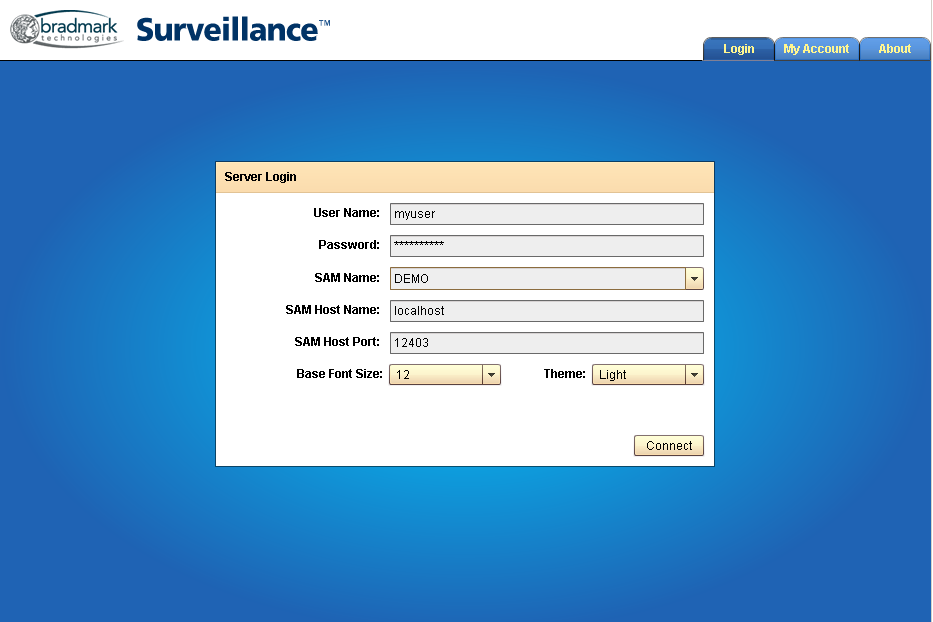
Login Screen
| Field | Description |
|---|---|
| User Name | Name of the login credentials to use |
| Password | Password of the login credentials to use |
| SAM Name | Name of the SAM (server) to log into. This is automatically filled in. In advanced configurations, there may be more than one SAM in the dropdown box to choose from, but this is not typical. |
| SAM Host Name | Host name of the SAM (server) to log into. This is automatically filled in. In advanced configurations, this value may be changed, but this is rare. |
| SAM Host Port | Host port of the SAM (server) to log into. This is automatically filled in. In advanced configurations, this value may be changed, but this is rare. |
| Base Font Size | Size (in points) to use for most text in the web client. This can be changed in the My Account tab after login, but for best results, change it here, if needed. |
| Theme | Theme (color, etc.) to use in the web client. This can be changed in the My Account tab after login, but for best results, change it here, if needed. |
| Connect | After completing the User Name and Password fields--and other fields as necessary--click on the Connect button to log into the server. |