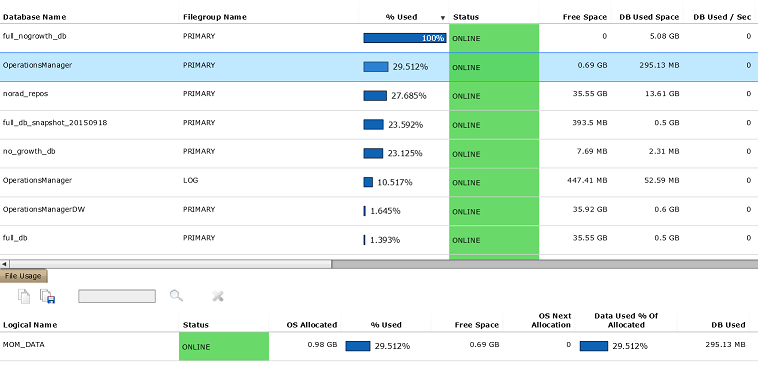
| Database Name |
Database name |
| Filegroup Name |
Filegroup name; LOG = Log files |
| % Used |
% of total usable space (database + OS) that is used |
| Status |
Filegroup status (ONLINE, SUSPECT, UNAVAILABLE) |
| Free Space |
Total unused space over all OS volumes holding files from this filegroup |
| DB Used Space |
Amount of space (database) used in the filegroup |
| DB Used / Sec |
Additional amount of space (database) used in the filegroup per second, in interval |
| Avg DB Used / Sec |
Average additional amount of space (database) used in the filegroup per second, since collection started |
| Delta DB Used |
Delta amount of space (database) used in the filegroup |
| Avg Delta DB Used |
Average of delta amount of space (database) used in the filegroup, since collection started |
| Is Sparse? |
Whether any file in the filegroup is a sparse file (i.e. for snapshots) |
| Is Growth Unlimited? |
Whether any file in the filegroup has growth unlimited |
| DB Free Space |
Unused space (database) |
| OS Allocated |
Amount of space (OS) used in the filegroup |
| OS Free Space |
Total unused space (OS) over all OS volumes holding files from this filegroup;
if OS free space is too small for next (grown) file extent for a file, then that will be shown under OS Unusable Space,
and the value considered here, for that file on that volume, will be 0 |
| OS Unusable Space |
Total amount of unusable space (OS) over all OS volumes holding files from this filegroup;
for example, OS free space that is too small for next (grown) file extent |
| Max Size |
Total maximum size imposed on the filegroup over all files;
0 = On all files, no growth allowed or unlimited growth (subject to OS space);
the meaning of this value will be ambiguous if a filegroup has a mix of unlmited growth and limited growth files |
| File Count |
Number of files in the filegroup |
| Not Online File Count |
Number of files in the filegroup that are not online |
| Suspect File Count |
Number of files in the filegroup that have suspect pages |
| Suspect Pages |
Number of suspect pages in the filegroup |
| Read Only File Count |
Number of files in the filegroup that are marked read-only |